Pickleball Tournament Management App
As a key component of Pickleball360, the tournament management app streamlines the end-to-end process of organizing and running pickleball events, empowering organizers to manage every detail with clarity and ease.
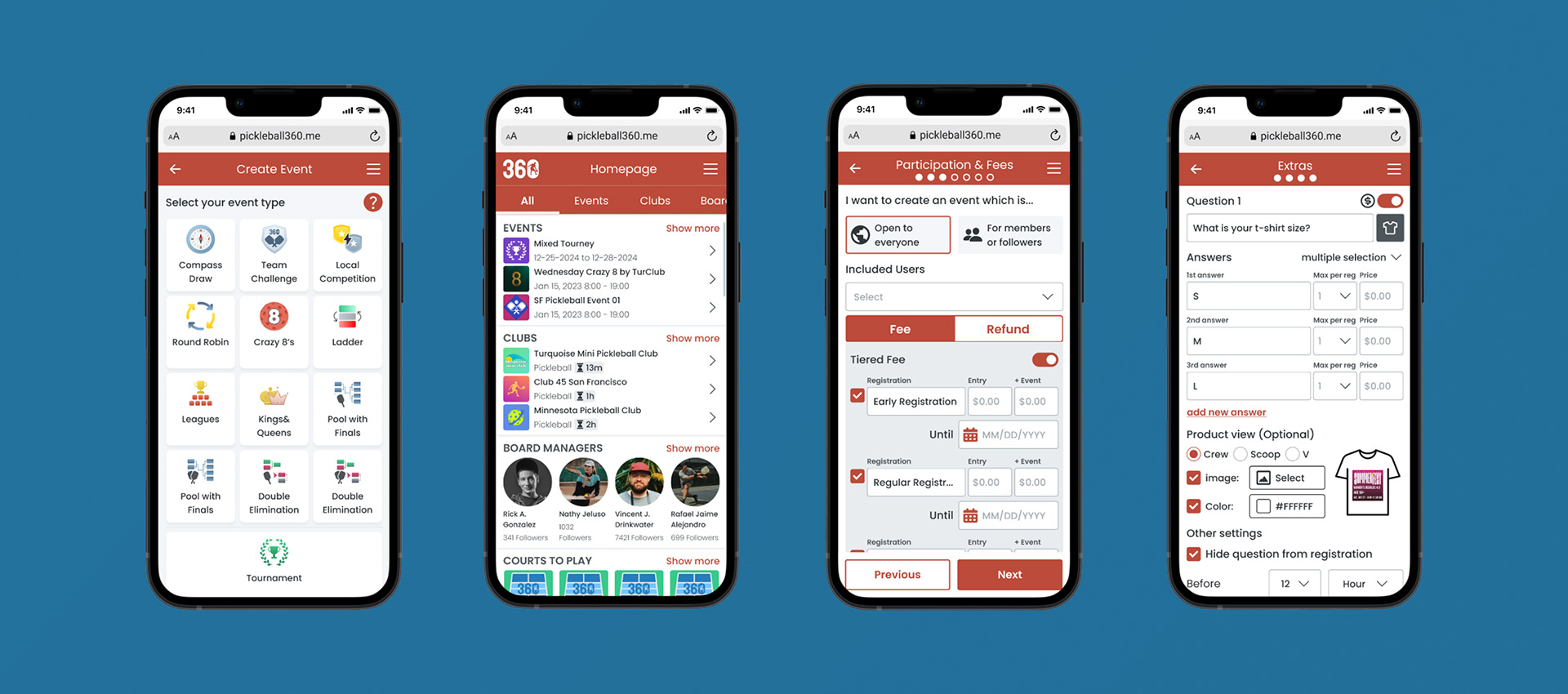
Pickleball360 aims to simplify the management of local pickleball tournaments by providing a centralized platform for event organizers and athletes. Originating in 1965, pickleball has grown rapidly in popularity across the United States, even becoming Washington’s official state sport in 2022. In response to this surge, Pickleball360 was designed to streamline tournament operations, reducing reliance on fragmented tools and making the entire process more efficient, user-friendly, and accessible for everyone involved.
Challenge
The idea for Pickleball360 began with firsthand observations of the challenges faced by both players and organizers during local tournaments. As participants, we experienced the confusion caused by fragmented communication and inconsistent event management. From the organizer’s perspective, managing tournaments often required juggling multiple tools — from alternative software and scattered Excel sheets to printed papers — making the process inefficient and error-prone. The lack of a unified solution highlighted a clear need for a platform that could streamline operations, reduce complexity, and improve the overall tournament experience for everyone involved.
How might we create a centralized and simplified solution that enables pickleball tournament organizers and participants to manage and experience events seamlessly from a single platform?
Objective
Researching the problem space
In recent years, pickleball has experienced explosive growth in the United States, becoming the nation’s fastest-growing sport. According to the Sports & Fitness Industry Association (SFIA), the number of active players jumped from 4.8 million in 2021 to 8.9 million in 2022, and by 2024 nearly 20 million people were playing regularly. Broader surveys indicate that more than 48 million Americans have tried the sport at least once, with younger demographics fueling much of this momentum. This rapid expansion has also driven the construction of over 68,000 courts nationwide, highlighting both pickleball’s cultural rise and the growing challenges of managing tournaments efficiently at scale.
Research goals
• Understand who is playing pickleball and their motivations
• Identify frustrations faced by organizers and participants during tournaments
• Identify features that would be most valuable for beginner players and new organizers
• Analyze current resources and tools offered by competitor platforms
• Validate the need for an all-in-one tournament management solution and explore platform opportunities
What are existing birding app resources?
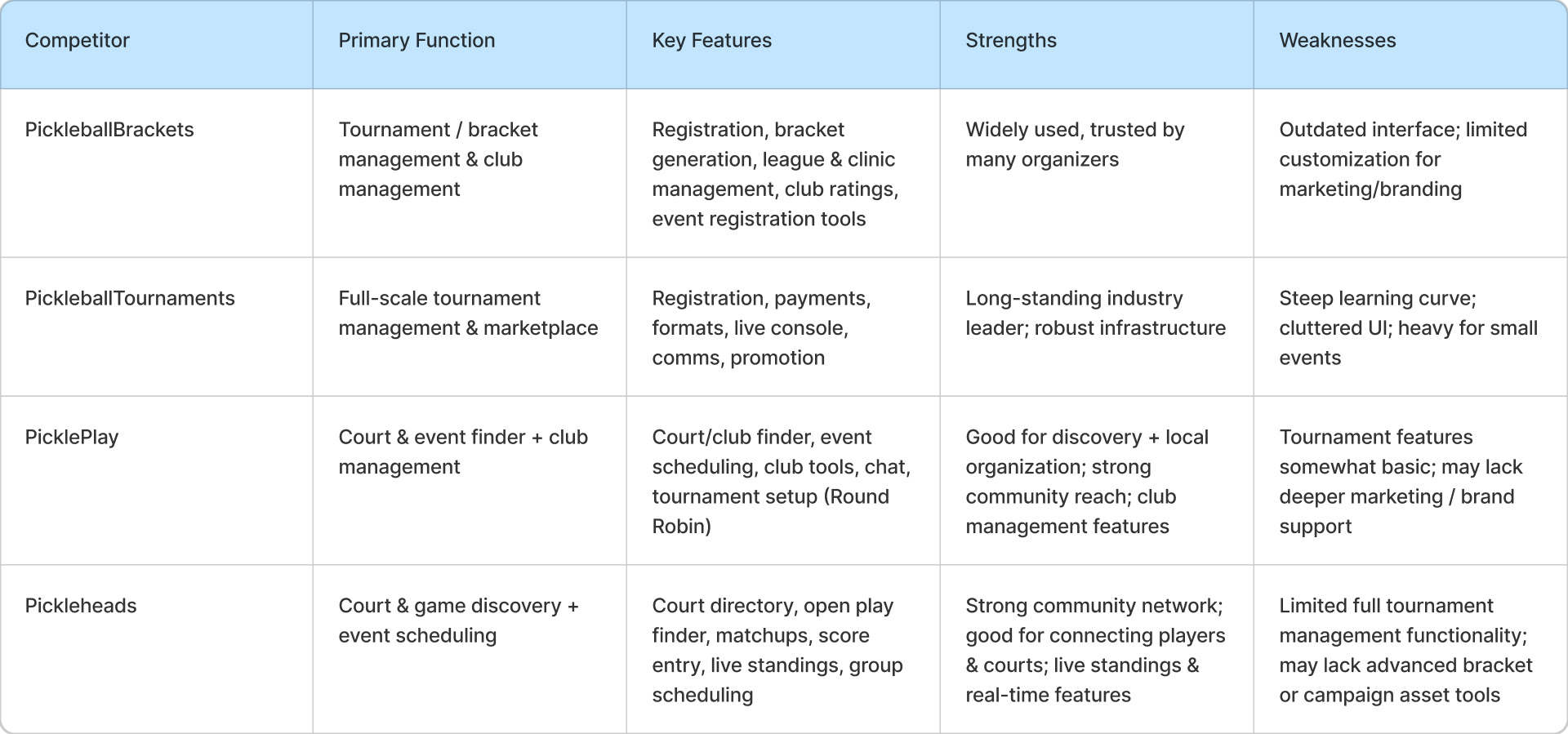
Analyzing some of the most popular pickleball resources revealed that existing apps tend to focus on very specific needs rather than offering an all-in-one solution. For example, PickleballBrackets provides tools for tournament scheduling and bracket management, while it mainly focuses on registration and score tracking. Each of these platforms addresses an important part of the process, but none delivers a fully centralized experience for both organizers and players.
Interestingly, this fragmentation was also raised by participants during our user interviews, reinforcing the need for a more comprehensive and streamlined digital solution.
Interestingly, this fragmentation was also raised by participants during our user interviews, reinforcing the need for a more comprehensive and streamlined digital solution.
Pickleball Tournament Apps Competitive Analysis
Interviewing users on pickleball tournament experiences
“How do you organize and experience pickleball tournaments?” To explore this question, we conducted several video call interviews with both organizers and participants based in California, Florida, and Mexico. Our goal was to better understand the processes and resources that experienced organizers currently rely on, as well as the pain points that often disrupt smooth event management. We also aimed to uncover barriers that prevent newer organizers and players from having a more seamless tournament experience.
While finding willing participants posed initial challenges, especially given busy tournament schedules, we eventually connected with key individuals through local pickleball communities and gathered valuable insights into the frustrations and needs within the current system.
The user interviews revealed 5 key insights:
Playing is a social and competitive experience.
Pickleball brings people together through friendly competition and community spirit. Players enjoy both the social side of meeting others and the thrill of improving their game.
Tournament management is a complex challenge.
Organizers find it exciting but difficult to manage brackets, schedules, and player communication smoothly. Without clear tools, important details can easily get lost or cause confusion.
Better preparation = smoother tournaments.
For both organizers and players, preparation is key. Setting clear schedules, confirming participants, and sharing updates early helps tournaments run efficiently and reduces last-minute stress.
Accessible and simple tools matter.
Complex tools slow down the process and discourage users. A digital platform for tournament management needs to be straightforward, fast, and easy to use even for beginners.
Data and transparency build trust.
Players value seeing live scores, brackets, and updates. When information is accessible to everyone, it creates a fairer and more engaging tournament experience.
Building user empathy
The competitive analysis and user interviews gave us a clearer picture of who our users were and how they might interact with a pickleball tournament platform. Building on these findings, we translated insights into concrete visualizations such as personas and user journeys, allowing us to better empathize with both organizers and participants while defining the scope and direction of the product.
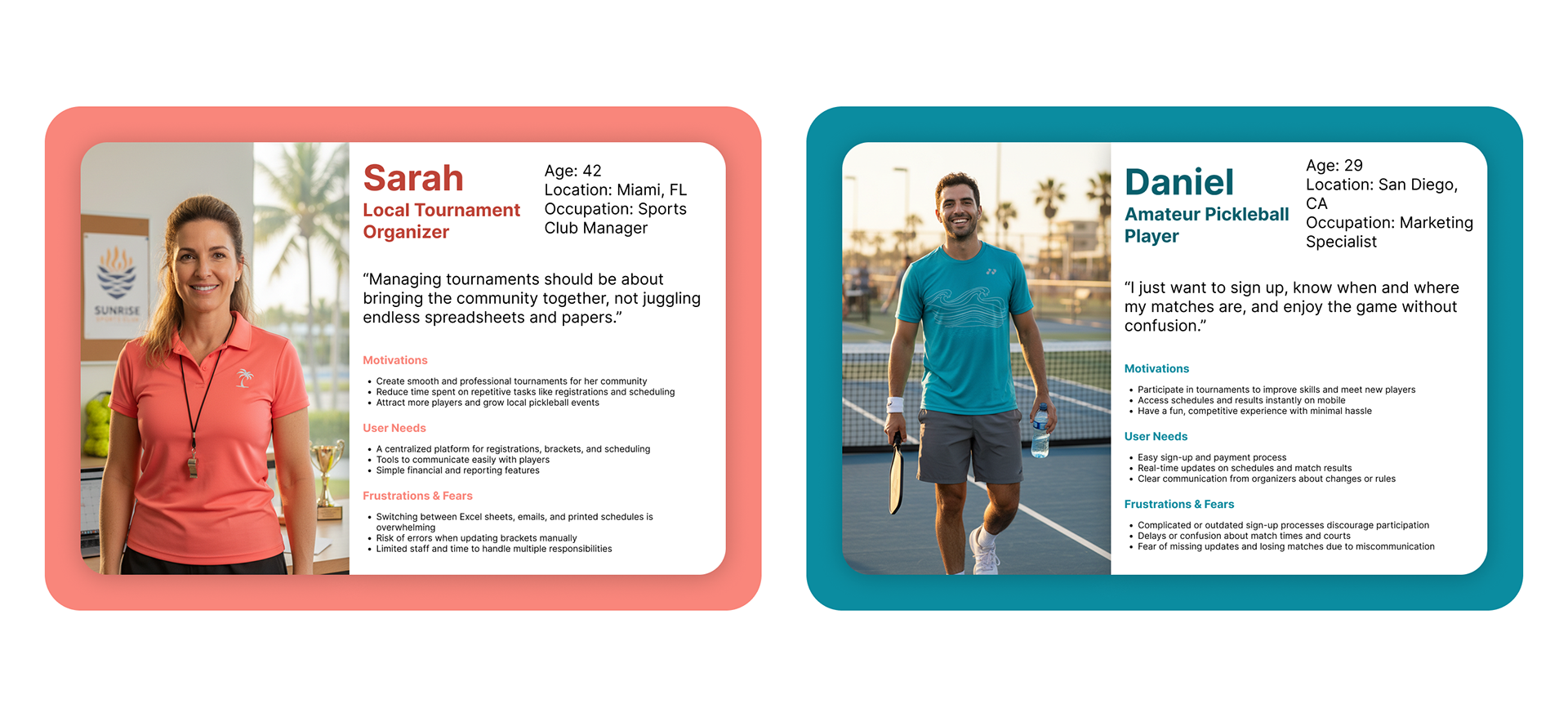
Persona Development
Based on patterns from our user insights, we developed two personas – a tournament organizer and a participant (athlete). Since the goal of the project was to create a platform that effectively serves both user types, it was important to consider the needs and behaviors of each persona. As such, we evaluated both personas separately throughout the development of the application to ensure the product was valuable and intuitive for everyone involved.
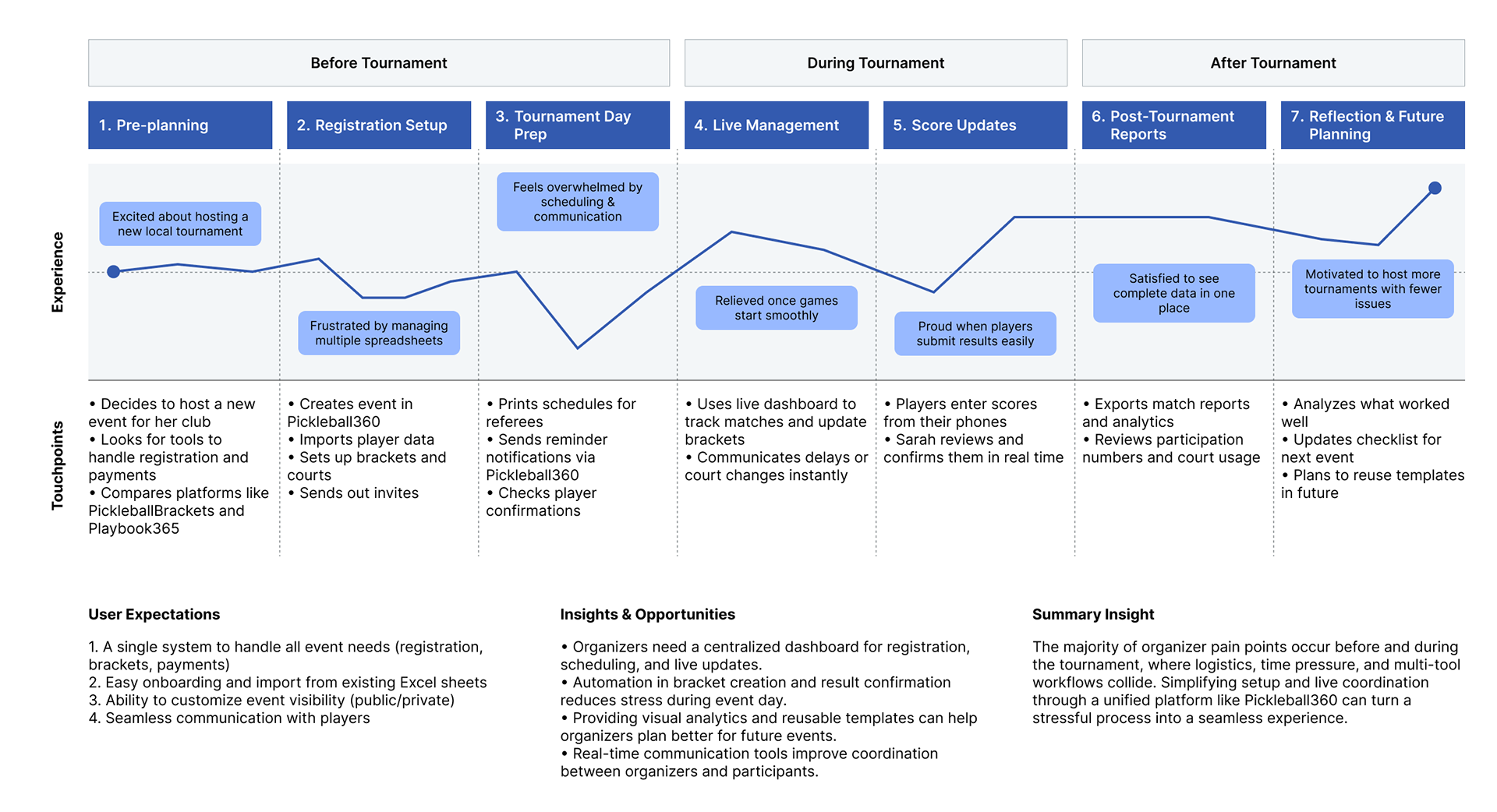
Most of the participant’s journey takes place outside of the pickleball tournament itself, including preparation, scheduling, and community interactions.
Talking to users helped us realize the pickleball journey started and ended well before and after the actual tournament. The users’ actions and decision-making begin with registering or preparing for the tournament, continue through scheduling and practice, and extend to following up, reflecting, and engaging with the community days later.
We created a user journey map to visualize the thoughts, feelings, and experiences shared by our interviewees, helping us identify the main touchpoints that the application would need to address for both tournament organizers and participants.
Translating needs into features
Based on the touchpoints and needs identified during the empathizing phase, we developed a Product Feature Roadmap to define key features for the app and guide our upcoming design work for both tournament organizers and participants.
Prioritization was determined based on the alignment of a feature’s value with the project’s goals and users’ needs. To quickly launch an MVP and test a wide range of features, we had to slightly compromise on the interface aesthetics. We focused on features essential for both tournament organizers and participants, ensuring the core functionality was effective while leaving room for future design refinements.
Design & Prototype
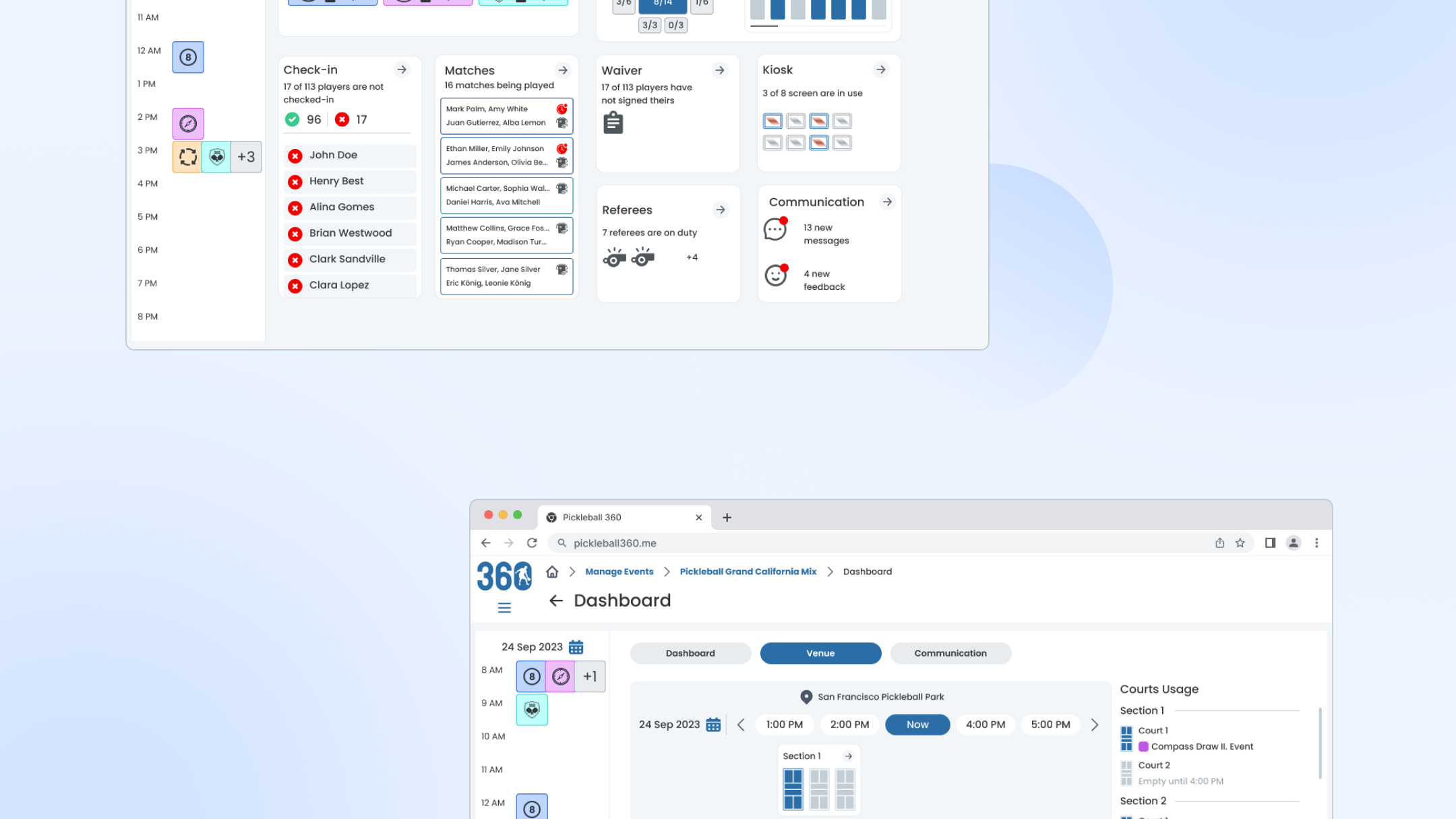
With a clearer understanding of the users and the priority app features, we began designing how those features would come to life. Pickleball360 would focus on several core capabilities:
• Creating pickleball tournaments with participant lists, suitable bracket formats, and financial management tools
• Adding or inviting participants, keeping them informed at every stage, managing legal procedures, and handling payments seamlessly
• Recording scores during the tournament and making them instantly accessible to all participants
• Storing and sharing all tournament details afterwards, while enabling participants to track upcoming events
Sketching user flows & defining tournament management processes
To establish user flow and content layout, I sketched out wireframes for the key screens users would need to complete the main tasks. One of the biggest considerations was designing how the tournament creation and participation flows would work, as these involved multiple steps such as registration, brackets, payments, and communication.
This part of the process required researching existing tournament management practices and digital tools to understand their limitations and opportunities. For example, we later introduced a streamlined participant onboarding flow with clear confirmation steps, ensuring both organizers and players could complete required actions smoothly and without confusion.
Balancing Functionality Over Aesthetics
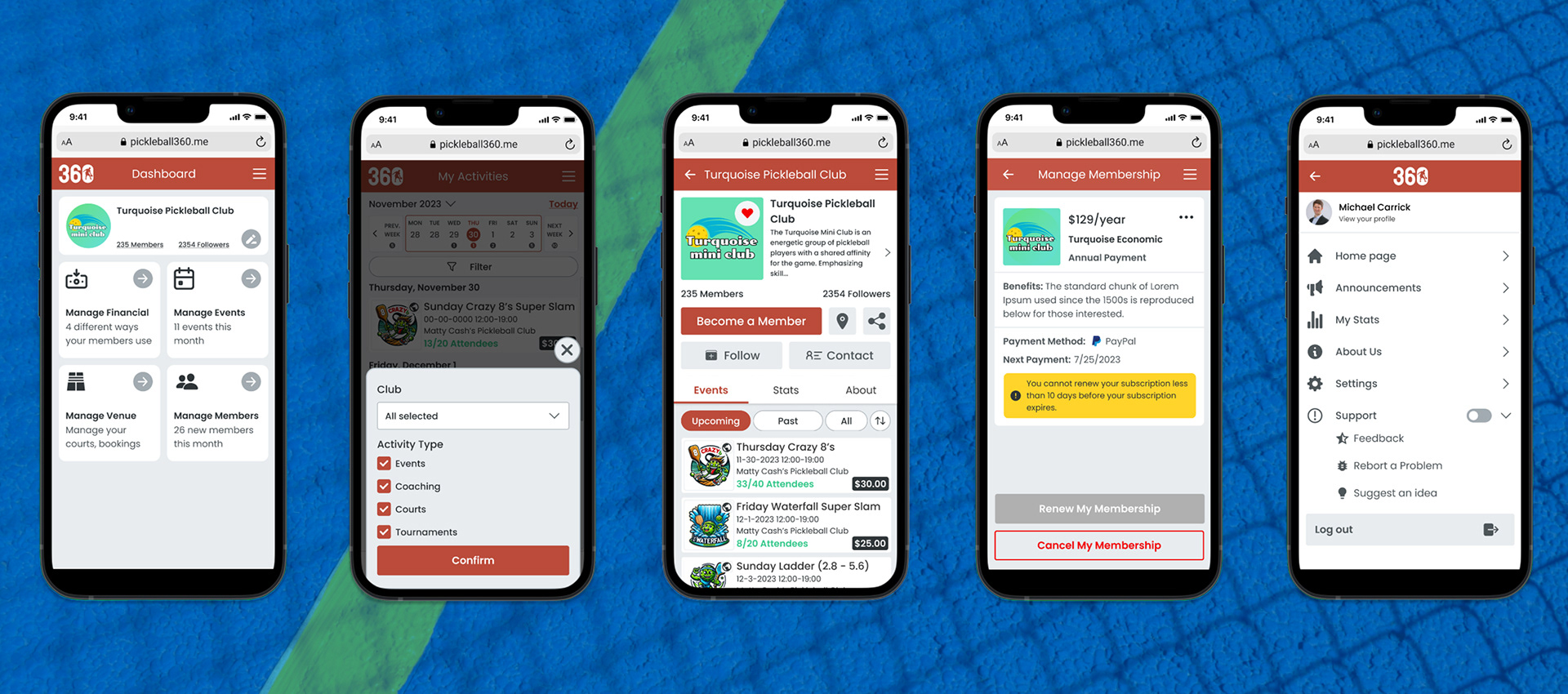
While designing the UI for Pickleball360, we had to take into account the limited project timeline and the need to simplify the development process for our team. For this large-scale MVP, time was constrained both on the design side and, even more critically, on the development side. As such, prioritizing functionality over visual aesthetics was a deliberate decision, aligned with the company’s request.
Additionally, when analyzing competitors, we noticed that most platforms also did not emphasize strong visual aesthetics, which further validated our approach. This allowed us to focus on delivering a reliable and testable MVP quickly, while keeping the door open for future visual refinements.
Test & Iterate
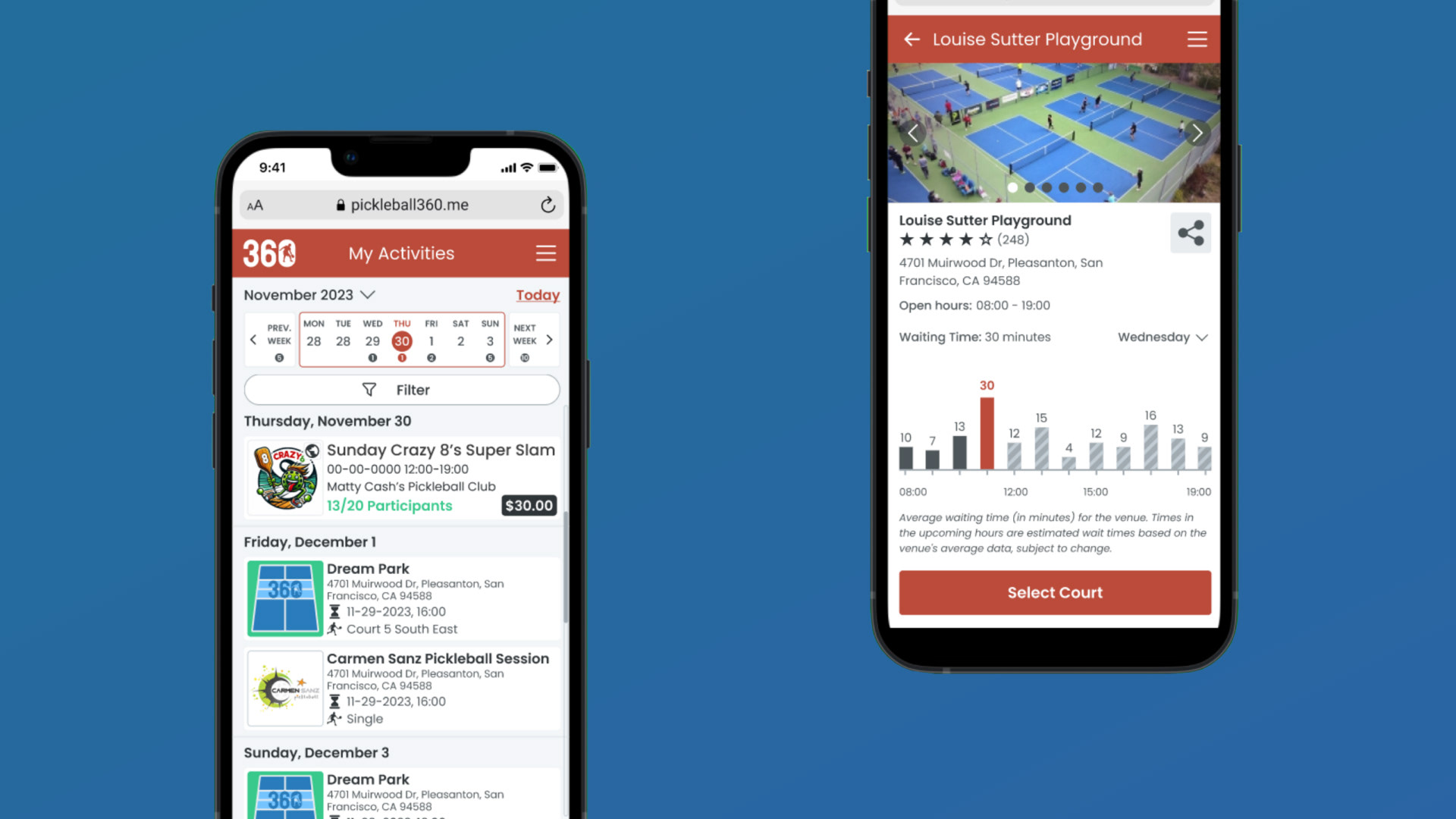
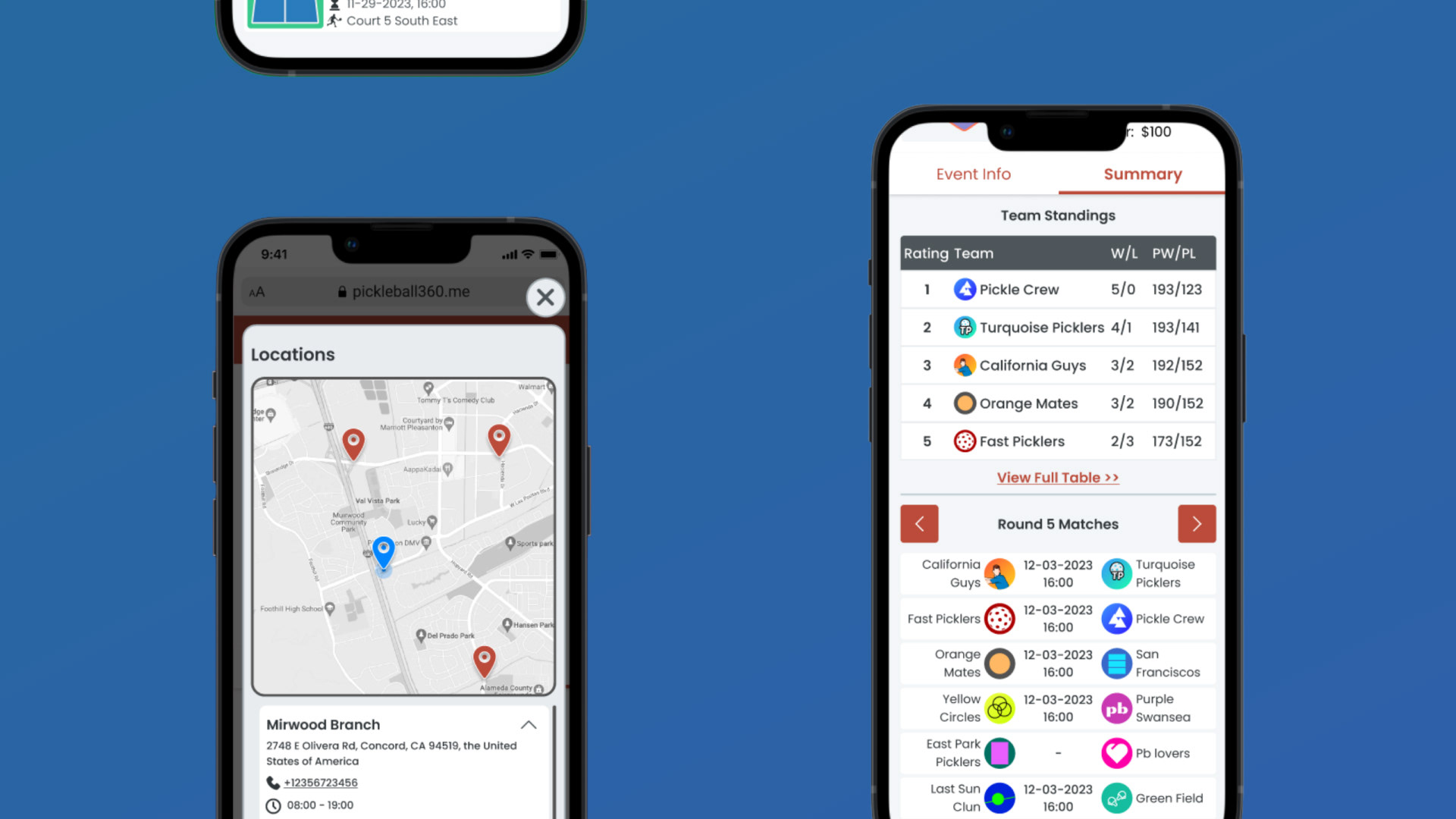
The app design included navigational and technical features such as creating tournaments, managing participants, and tracking scores. We conducted usability testing through online interviews, where we presented users with the Figma prototypes I had prepared, observed their interactions, and gathered feedback.
Challenges of remote testing
In order to observe user interactions more closely, it was important for the tests to be moderated. However, due to our project setup and time constraints, the most practical method was to conduct all sessions remotely through online calls.
With limited time and resources, finding the most effective way to run these remote prototype tests was a challenge. We shared the Figma prototypes with participants and asked them to walk us through their actions while sharing their screens.
This allowed us to observe their navigation choices, click paths, and overall flow usage. The tradeoff was not being able to fully capture body language or subtle reactions, which we compensated for by asking targeted follow-up questions to gather deeper feedback.
Revisions and final wireframes
Testing revealed a few key insights that guided our revisions. Based on the age range of our target audience, we adjusted the size of certain buttons and text to improve readability. Interestingly, while our team was not fully satisfied with some of the color choices, participants gave positive feedback on them, which led us to keep those decisions.
We also discovered that some critical features—ones we considered unique selling points—were not being noticed or used by participants. To address this, we repositioned these elements more prominently in the interface, ensuring users could easily recognize and interact with them.
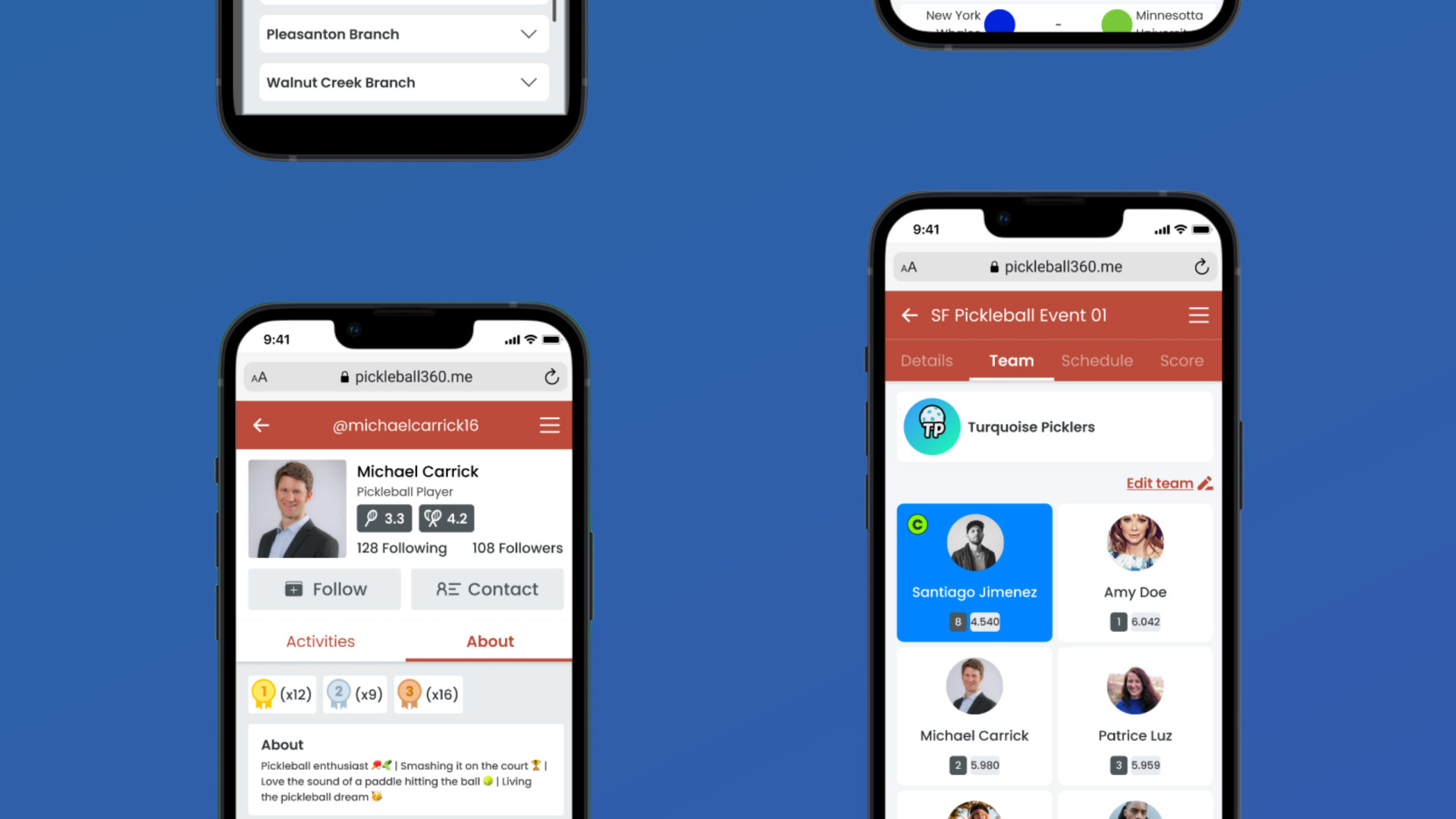
Prototype
Project Reflection
What's next?
Following the first round of testing, the next steps would be to iterate and design for features beyond the MVP.
• Build out phase 2 & 3 features – such as advanced tournament analytics, player rankings, and community engagement tools
• Conduct a second round of user testing with participants and organizers to identify remaining usability issues
• Prepare deliverables for development handoff
Project Takeaways
I knew going into this project that it would be a challenge. Which features are most important for tournament organizers and participants? How can we ensure smooth interaction within the constraints of time and development resources? Considering the varying experience levels of players, how can the app provide an intuitive and supportive experience for everyone? I truly enjoyed the process of designing and strategizing user flows and interactions throughout the project.
Some key takeaways are:
- Create a well-organized project plan. With many aspects to manage, a clear strategy helps prioritize what’s needed for the MVP while keeping track of future enhancements and backlogs.
- Understand tradeoffs in decision-making. Knowing when and why to implement certain features or approaches is essential to delivering a successful product within time and resource constraints.
- Leverage existing patterns to reduce cognitive load. Designing completely new interactions for common functions isn’t necessary if users already expect standard behavior, such as registration flows, bracket navigation, or score tracking.
While no app can solve every challenge immediately, a well-designed platform like Pickleball360 has the potential to address key community needs and, as it evolves, gradually provide solutions for nearly every aspect of tournament management and player engagement. By improving access to information, communication, and resources, the app can strengthen the pickleball community and support its continued growth.